
December 23, 2024
Easy Document Management in ForeFlight
I love the Documents feature in ForeFlight. It makes it incredibly easy to very quickly access documents in just a few taps in the app. In a busy cockpit, speed and efficiency is of the essence!
However, managing documents efficiently can be a challenge—especially when it comes to moving them into ForeFlight, keeping them organized, and ensuring they stay up to date.
The good news is that ForeFlight has a fantastic integration with cloud storage providers like Dropbox, Google Drive, and Box that many pilots overlook. This feature simplifies document management and ensures you always have what you need at your fingertips. This feature is available on the Pro Plus (i.e. the middle-level plan) and above.
The solution: ForeFlight’s cloud storage integration
ForeFlight’s integration with cloud storage providers is a game-changer. By linking your ForeFlight app to a cloud service like Dropbox, instead of going through the tedious process of moving documents into ForeFlight one at a time, managing your documents becomes as easy as moving documents into a folder on your computer. Just like ForeFlight keeps your aviation databases up to date, ForeFlight will automatically download any update available for your own documents.
How I use it
Personally, I use Dropbox for managing my aviation documents. Here’s how I make it work:
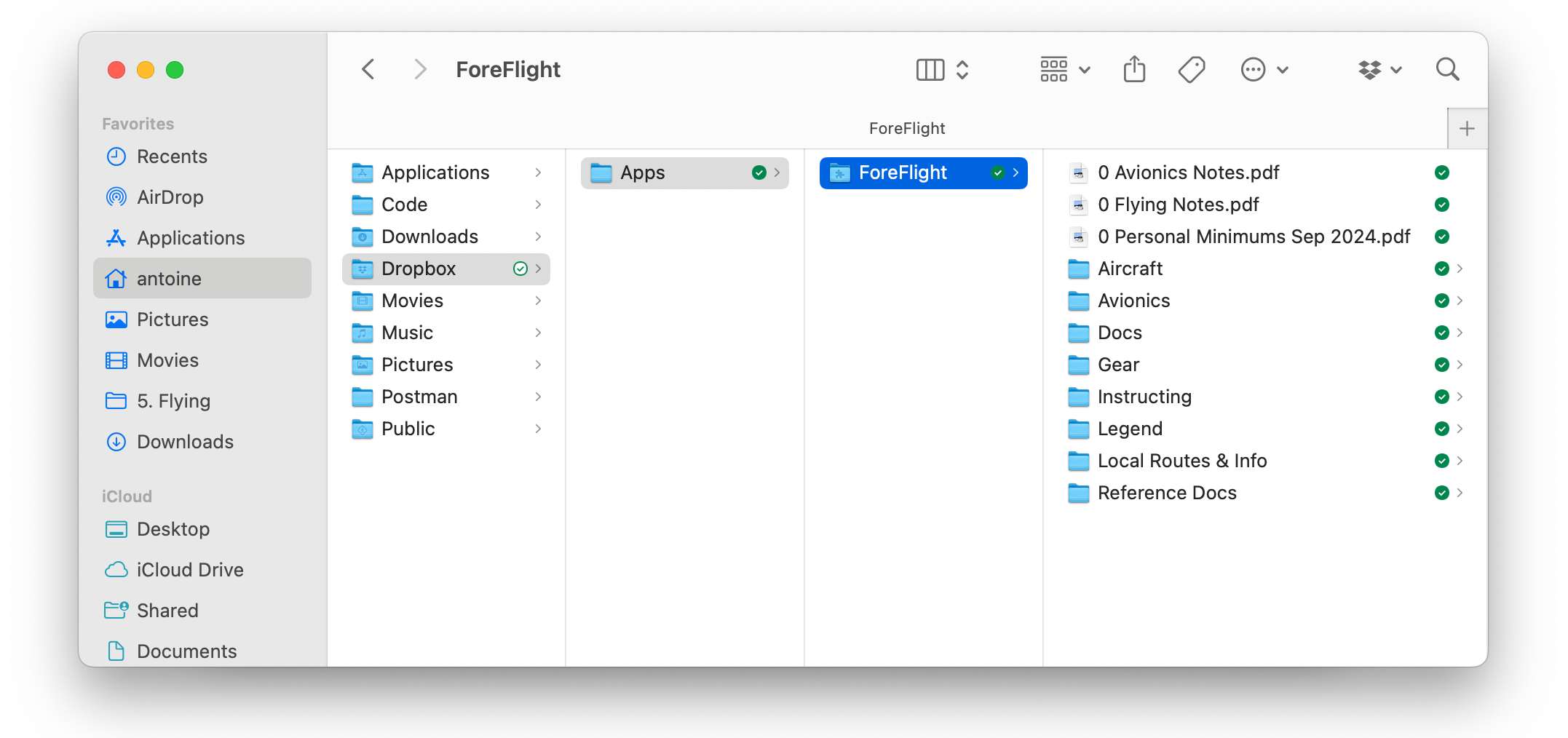
Dropbox integration: I use the Dropbox Mac app, which integrates directly into my Finder. This makes accessing my Dropbox folders effortless on my computer.
ForeFlight folder: Once you link Dropbox to ForeFlight, a dedicated ForeFlight folder will be available in Dropbox. I simply drag and drop documents into this folder to make them available in the ForeFlight app. You can also use sub-folders to keep your documents organized.
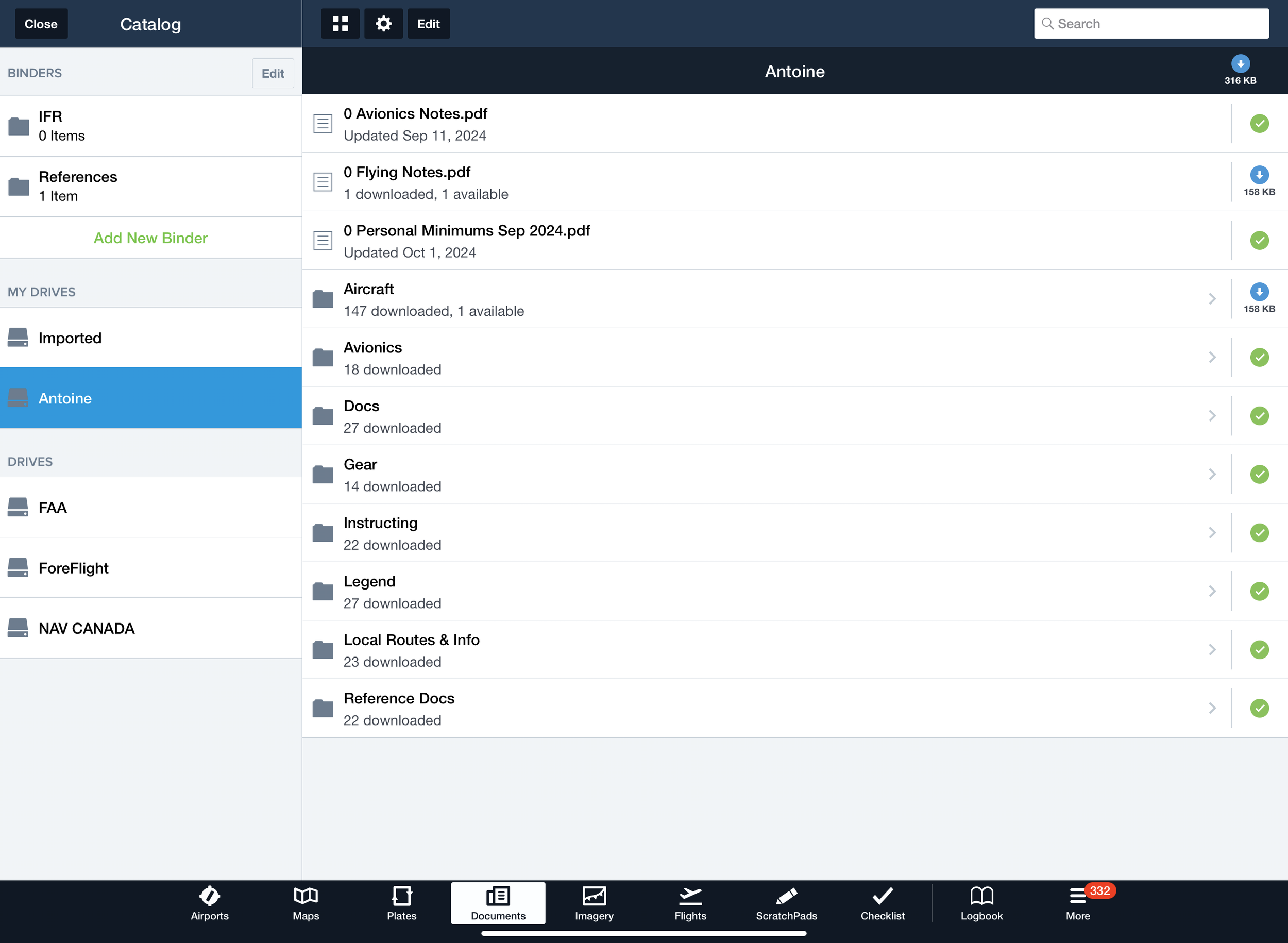
Sync across devices: Any document I add or update in Dropbox is instantly accessible in ForeFlight on my iPad and iPhone. Additionally, I can access these documents directly in the Dropbox app from anywhere.
And it’s free! Dropbox offers 2GB of free storage, which I’ve found more than sufficient for managing aviation documents.
Here’s a look at the types of documents I store in my ForeFlight Dropbox folder to stay organized and prepared:
-
Scanned versions of my pilot document: includes certificates, medicals, and endorsements for quick reference.
-
Aircraft-specific information: POHs (Pilot Operating Handbooks) for the aircraft I fly, as well as a short, custom-made document summarizing key performance and operational details for each type I fly. Very valuable when you keep switching types!
-
Avionics pilot guide: manuals and cheat sheets for the avionics systems I frequently use.
-
Instructional resources: lesson plans, maneuver guides, and other teaching materials I use with students.
-
FAA publication legends: PDFs summarizing legends for sectional charts, enroute charts, and other FAA publications.
-
Local information: PDFs describing VFR transition routes for navigating complex airspaces as well as noise abatement procedures for the airports I visit.
Here’s what it looks like on my computer:
And here is how it looks like in ForeFlight. As you can see, some documents require an update, and they will be updated alongside the aviation database.
How to set it up
Getting started with ForeFlight’s cloud storage integration is simple. Here’s how:
-
Link your cloud storage account: use a supported provider like Dropbox, Google Drive, or Box. For detailed instructions, check out ForeFlight’s setup guide.
-
Organize your folders: create a logical folder structure in your cloud storage (e.g., “Pilot Documents,” “POHs,” “Checklists”) to keep everything easy to find.
-
Sync with ForeFlight: once your account is linked, any file added to the designated ForeFlight folder will sync automatically, making it accessible on all your devices.
A powerful feature for pilots
ForeFlight’s integration with cloud storage providers like Dropbox makes document management stress-free. By keeping your files organized and up to date, you’ll always have what you need, whether you’re planning a flight, teaching a lesson, or in the air.
If you haven’t tried this feature yet, I highly recommend giving it a shot—especially if you’re already using a cloud storage platform. Remember, you’ll need the Pro Plus plan or higher to access this feature, but the time and hassle it saves are well worth it.